Changing the signal power level in wireless network settings
In the router's web interface, in the advanced settings for the Wi-Fi wireless network, there is a parameter called Signal power level.
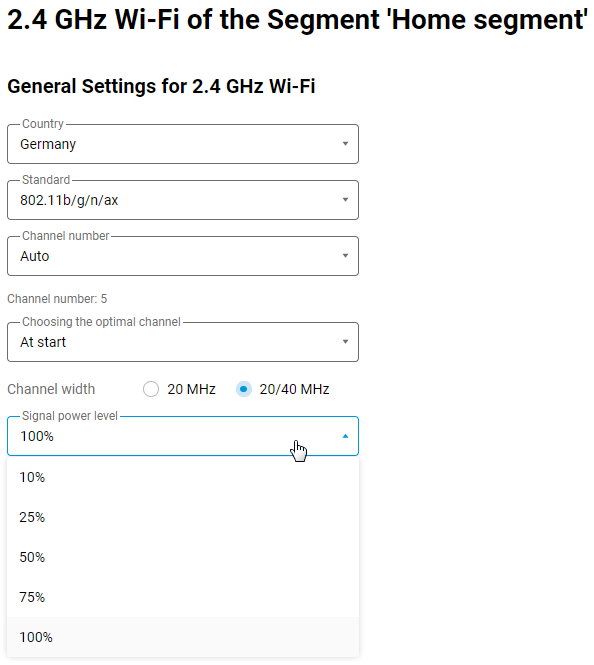
This parameter changes the Wi-Fi signal power emitted by the Wi-Fi transmitter. The available preset values are indicated as a percentage of the maximum power: 10%, 25%, 50%, 75% and 100% (default).
At 100%, we achieve the maximum nominal power of routers, which is 20 dBm.
When this parameter is changed, the following attenuation occurs:
75%: nominal power is reduced by 1 dBm and is 19 dBm;
50%: nominal power is reduced by 3 dBm and is 17 dBm;
25%: nominal power decreases by 6 dBm and is 14 dBm;
10%: nominal power decreases by 9 dBm and is 11 dBm.
The measurement error when obtaining these values is ±1 dBm.
It is important to note that when measuring signal strength using programmes such as InSSIDer (and similar programmes), we obtain the signal strength received by the receiver (RSSI), not the signal source strength (TX Power).
The RSSI value is highly dependent on the environment in which the signal propagates and external factors, as described in detail in the article What affects Wi-Fi networks? The possible sources of interference.. The power of the source itself can only be obtained with special equipment capable of measuring the output power of the Wi-Fi transmitter of the access point directly. In this case, the measuring equipment is connected directly to the transmitter, thereby eliminating external factors (attenuation in the environment, interference, etc.).
Please also note that, as a rule, the transmitter power in a router is several times greater than the transmitter power on client devices, especially mobile ones. Within the network coverage area, there may be places where the client can 'hear' the access point well, but the client's access point cannot hear it well or cannot hear it at all (a situation where there is a signal on the client device but no connection). Asymmetry arises in the communication channel due to different power and sensitivity values of the receivers. To ensure a good signal level, the connection between the client device and the access point should be as symmetrical as possible, allowing the access point and the client to communicate clearly. Strange as it may seem, to eliminate asymmetry and obtain a more stable connection, it is sometimes necessary to reduce the transmitter power at the access point.
Please note that the dBm power scale is non-linear, so when the power is halved, the dBm signal level will not decrease by the same amount.
If you need to set a value for the Signal power level that is not in the preset list, you can do so using a special command via the device's command-line interface (CLI). You can set any signal power value from 1 to 100.
Command to set the signal power for the 2.4 GHz Wi-Fi network (the WifiMaster0 interface is used for this network):
interface WifiMaster0 power <value>
Command to set the signal strength for the 5 GHz Wi-Fi network (the WifiMaster1 interface is used for this network):
interface WifiMaster1 power <value>
For example:
(config)>interface WifiMaster0 power 40Network::Interface::Mtk::WifiMaster: "WifiMaster0": TX power level set. (config)>interface WifiMaster1 power 87Network::Interface::Mtk::WifiMaster: "WifiMaster1": TX power level set. (config)>system configuration save