How do I configure firewall rules for outgoing packets?
Important
This article provides information for experienced users.
The list of firewall rules created via the web interface is linked to a specified interface in the in direction, i.e., network packets entering the interface are analysed (for external interfaces, these are packets from the Internet to the router; for local interfaces, these are packets from hosts to the router). Checking outgoing packets (in the out) can be configured via the router's command-line interface (CLI).
Let's look at how this works using the example of rules that block ICMP traffic.
1. Suppose we use the web interface to create a rule that denies any ICMP protocol addresses for the external wired ISP interface.
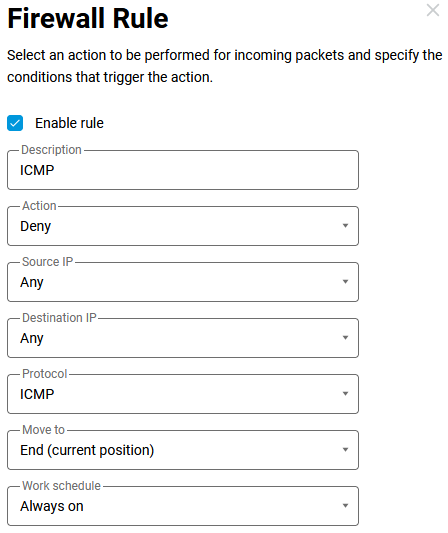
In the configuration file, we will see the following settings:
access-list _WEBADMIN_GigabitEthernet1
    deny icmp 0.0.0.0 0.0.0.0 0.0.0.0 0.0.0.0
    deny description ICMP

...

interface GigabitEthernet1
    rename ISP
    description ISP
    ...
    ip access-group _WEBADMIN_GigabitEthernet1 in
The specified list of rules is attached to the interface in the in direction (incoming). In this case, ping to external resources will not pass, but requests from the router and responses from the host will be visible on the interface. With this firewall rule, we will see ICMP request and reply packets in the dump.

2. To create a rule for out (outgoing) packets, you can use an existing list of rules by unbinding it and rebinding it to the interface. To do this, execute the following commands in sequence:
interface ISP no ip access-group _WEBADMIN_GigabitEthernet1 in

interface ISP ip access-group _WEBADMIN_GigabitEthernet1 out
3. You can also create an out rule (for outgoing packets) in the following way: in the web interface, delete the created rule (if it was created earlier) and use the CLI to create your own list of rules and bind it to the desired interface.
In our example, we created a list named MyACL with a deny rule for ICMP traffic, then linked it to the ISP interface and specified the out direction:
access-list MyACL deny icmp 0.0.0.0 0.0.0.0 0.0.0.0 0.0.0.0

interface ISP ip access-group MyACL out
As a result, ping to external resources will also fail, but ICMP traffic will no longer be visible on the interface, as it will be blocked before the request is sent.