Accessing a USB modem's web UI through a WireGuard VPN
Let's consider the option of configuring access to the web interface of a 5G/4G/3G USB modem that has its own management interface at 192.168.8.1 and is connected to a router that serves as a VPN client. We need to provide access to the USB modem's management interface from the local network of the ‘server’ through the VPN tunnel.

Let's take the WireGuard connection from the article Configuring a WireGuard VPN between two Keenetic routers as an example. After completing these settings, remote networks will be connected using WireGuard VPN, and access to hosts on both sides of the tunnel will be implemented. However, by default, there will be no access to the 5G/4G/3G USB modem interface, since the modem's IP address belongs to its own network (192.168.8.0). Additional settings will be required to access the modem's subnet and, therefore, the address 192.168.8.1.
Connect to the command-line interface (CLI) of the ‘client’ router to which the USB modem is connected.
Using firewall rules, create a packet filtering group for the modem interface (in our example, we are using a USB modem with the CdcEthernet connection type):
(config)>access-list modemNetwork::Acl: "modem" access list created. (config-acl)>permit ip 0.0.0.0 0.0.0.0 0.0.0.0 0.0.0.0Network::Acl: Rule accepted. (config-acl)>exitCore::Configurator: Done. (config)>system configuration saveCore::ConfigurationSaver: Saving configuration...
Enable the rule for the OUT direction (for outgoing packets) on the modem interface (in our example, this is CdcEthernet0) and use the ip static command to add a static rule for forwarding requests from the VPN tunnel network to the USB modem network (to the gateway, whose address is the WAN IP address of the CdcEthernet0 interface on the router):
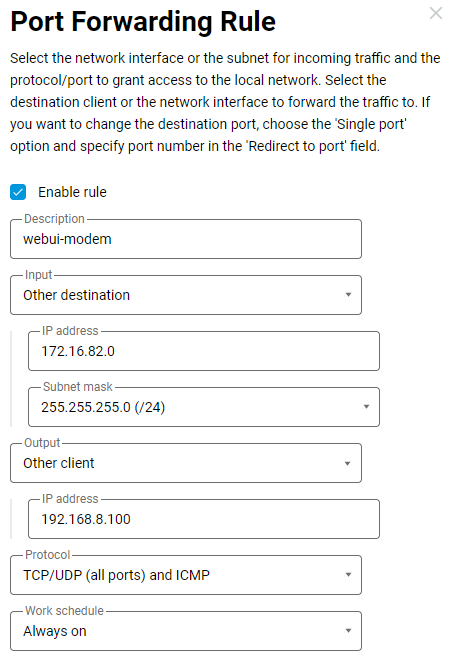
(config)>interface CdcEthernet0 ip access-group modem outNetwork::Acl: Output "modem" access list added to "CdcEthernet0". (config)>ip static 172.16.82.0 255.255.255.0 192.168.8.100Network::StaticNat: Static NAT rule has been added. (config)>system configuration saveCore::ConfigurationSaver: Saving configuration...
where 172.16.x.0 is the VPN tunnel network from which requests will be sent to the modem, and 192.168.8.100 is the WAN IP address of the CdcEthernet0 interface on the router (the 5G/4G/3G USB modem has its own DHCP server enabled and has assigned this IP address to the router); this address is the gateway to the USB modem network.
The ip static redirection rule will replace the source IP address when accessing the USB modem, as the source address will be unknown to the modem itself, and it will have to respond via the default route.
The above ip static rule can be created in the web interface of this router on the Port Forwarding page:
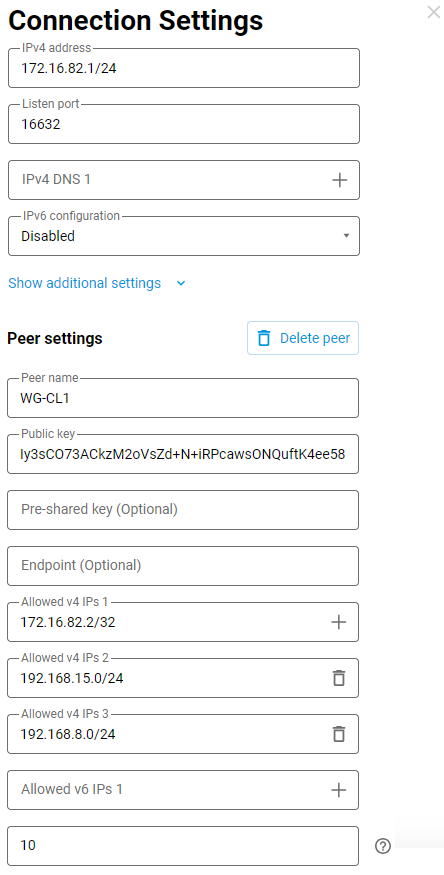
On the Wireguard server side, add the 5G/4G/3G USB modem network 192.168.8.0/24 to the Allowed v4 IPs:
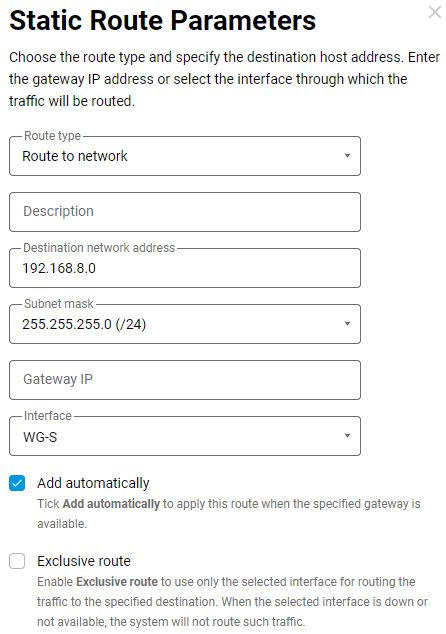
On the WireGuard server side, specify the route 192.168.8.0/24 to the 5G/4G/3G USB modem network:
Then, check access, for example, from the WireGuard server on the Diagnostics page, send ICMP requests to the USB modem address:
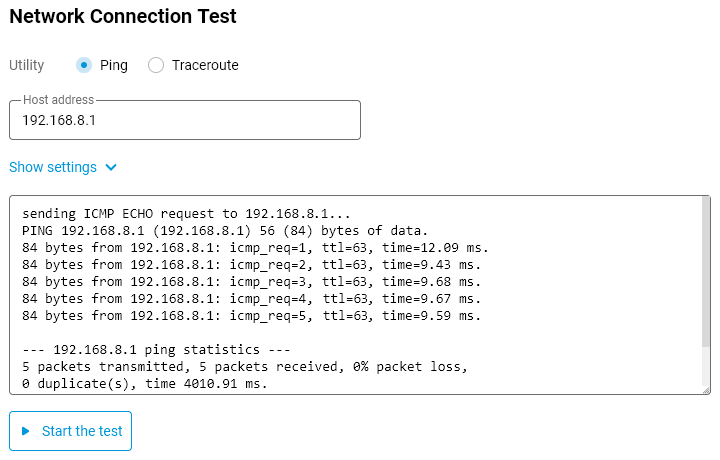
Now the USB modem's management interface will be accessible through the VPN tunnel.