Specifics of PingPlotter and WinMTR operation
Why can packet loss be detected on a router when using PingPlotter and WinMTR programmes for diagnosing network connections?
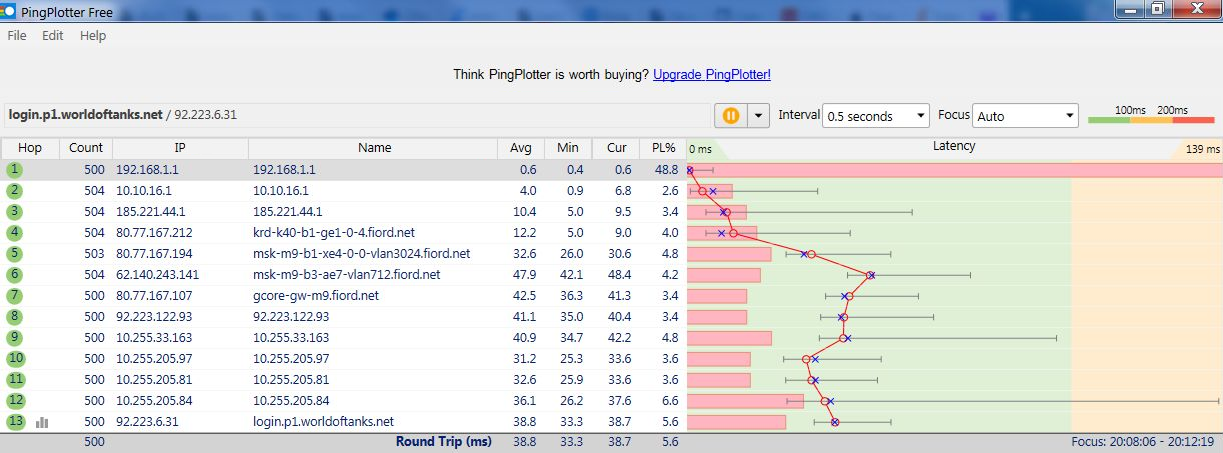
PingPlotter and WinMTR have certain particularities, and test results obtained through a router may not always be accurate.
We have previously studied the operation of PingPlotter and WinMTR and identified several key details that may affect test results:
Ping traffic (
ICMP echo requestandICMP echo reply) is not restricted in any way on the router.ICMP is always considered the lowest-priority type of traffic. ICMP packets, which PingPlotter and WinMTR use for tracing, are the lowest priority for the equipment, so if they are polled too frequently, they will simply be discarded. Such a check cannot guarantee to indicate where the problem lies, since both the server itself and the intermediate nodes may not respond to ping/tracert at all, but this does not indicate a problem; it is simply their configuration. Priority is given to other tasks. Losses should be taken into account at the final hop, comparing the number of packets sent and received. If the number of packets sent and received is equal, then there are no losses at the tested node, and losses at intermediate hops do not need to be considered.
If your test results show a small percentage of packet loss, it's usually not a big deal for most tasks, and you can ignore the small percentage of loss.
PingPlotter and WinMTR might not ‘lose’
ICMP echo replypackets, but they might loseICMP ttl-exceedednetwork packets. This is because they do not ping, but perform traceroute (tracert) by sending UDP datagrams.The router has a minimum
ICMP ttl-exceededpacket transit interval of 1000 ms (parametericmp_ratelimit 1000in the router configuration). This is done for security reasons, as there are types of attacks involving source IP address spoofing that can force equipment to send ICMP requests to another IP address.In a half-second interval, PingPlotter sends requests based on the number of hops to the node being tested. If the node is far enough away, for example, 10 hops away, the actual frequency of sending requests will be 500 ms / 10 = once every 50 ms. PingPlotter will not receive a response to most of these requests and will draw a red rectangle on the graph.
You can verify that the problem will not occur by using PingPlotter to check the nearest gateway of your provider, for example.
Alternatively, you can run
ping -t 192.168.1.1in the Windows command line. If there is no ping loss, then the losses reported by PingPlotter at 192.168.1.1 have nothing to do with the loss of useful traffic packets.In WinMTR, the default request interval is 1 second, and if this interval is not reduced, there will be no problems.

You can allow ICMP ttl-exceeded packets to pass more frequently than once every 1000 ms in the router's command-line interface (CLI) using the command:
system set net.ipv4.icmp_ratelimit <number>
where
<number>is the minimum allowable interval in milliseconds.For example, execute the command:
system set net.ipv4.icmp_ratelimit 10
However, losses may still occur at hops, so it is recommended not to set the traceroute interval to more than once per second.
Important
Using the command
system set net.ipv4.icmp_ratelimit 10will help PingPlotter with packet loss, but will degrade the router's performance in terms of routing speed for all other traffic.There are also nuances in the operation of the Wi-Fi System. It uses the STP protocol, which is sensitive to any changes in topology. If there is a wired device in the System with an unstable link, the STP tree will constantly rebuild itself, and the network switch on the router will be blocked for several seconds.
If there are errors in the cable connection, you need to analyse the router's sytem log at such moments.
As for wireless connectivity, the problem may lie in the Wi-Fi itself. For applications and services that are sensitive to packet loss and delays, it is recommended to use a wired connection or a Wi-Fi connection in the 5 GHz band. The 2.4 GHz band is not well-suited for such tasks, and unstable ping in this band is not uncommon.
The main causes of Wi-Fi problems are covered in the article Why is my Wi-Fi connection with the router slow?
If packet loss is intermittent, it may depend on the routes taken by traffic to the server, the load on the backbone channels and hops along the way, the load on the server itself, and, of course, the performance of the provider's equipment.